




- Subjects >
- Computing >
- Key stage 1 >
- Year 1 >
- Programming 2: Bee-Bot >
Please note
Bee-Bot is a registered trademark of TTS Education and can be purchased from their website: www.tts-group.co.uk. Terrapin created and holds copyright for the Terrapin Bee-Bot online emulator.
Unit outcomes
Pupils who are secure will be able to:
- Write instructions for a person to follow.
- Carry out instructions written for a person to follow.
- Explain what each digital Bee-Bot button does.
- Create and test a short set of instructions.
- Check instructions and spot errors.
- Test instructions to check for further errors.
- Program a digital Bee-Bot using logical instructions.
- Identify and correct mistakes in a sequence when the digital Bee-Bot does not behave as expected.
Suggested prior learning
Programming 1: Algorithms unplugged
Get started
Teacher coding skills videos
Lessons
Lesson 1: Digital classroom robots
Lesson 2: Exploring digital Bee-Bots
Lesson 3: Programming digital Bee-Bots
Lesson 4: Digital Bee-Bot game
Lesson 5: Digital Bee-Bot mystery
Key skills
- Recognising that robots are

This content is for subscribers only. Join for access today.
Key knowledge
To know:
- Humans need to
This content is for subscribers only. Join for access today.
Key vocabulary
command
error
This content is for subscribers only. Join for access today.
Equipment list
Equipment needed across all lessons in this unit.
This list does not include equipment which is usually readily available in the classroom (e.g pencils, A4 paper etc)
 Download
Full equipment list for the subject
Quantities marked × will update. Items without quantities are unaffected
- Devices with internet access ×15
- Large space ×1
- Timer ×8
- Pots containing letters of the alphabet, using the pre-cut Resource: Alphabet, letter cards or magnetic letters ×1
- Terrapin Logo – Bee-Bot As needed
The equipment below is optional
- Colouring pencils ×30
This content is for subscribers only. Join for access today.
Related content
Unit resources


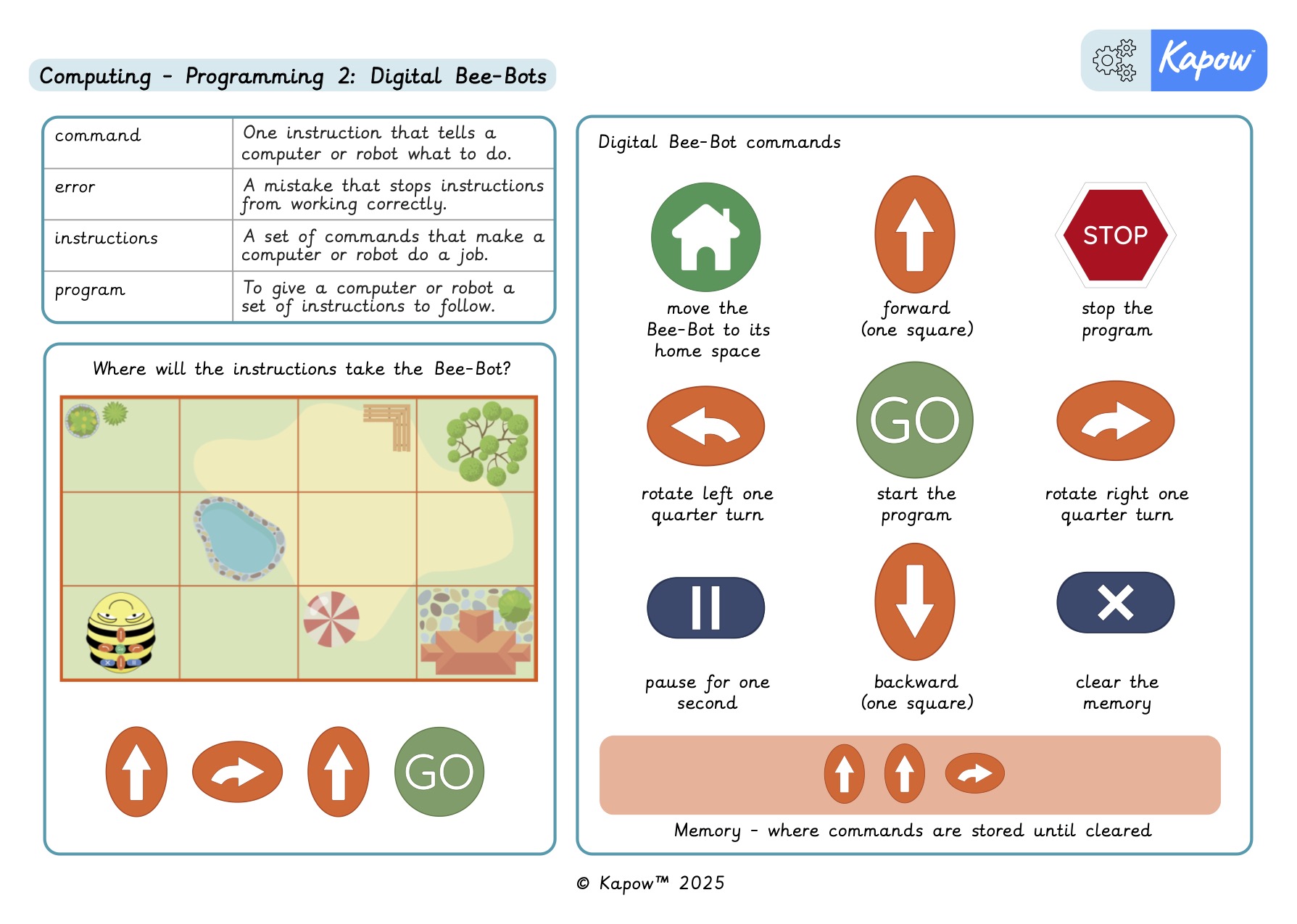
Knowledge organiser – Computing Y1: *New* Programming 2: Digital Bee-Bots
Aimed at pupils, a single page providing key facts, diagrams and definitions from the unit '*New* Programming 2: Digital Bee-Bots'.
Vocabulary display – Computing Y1: *New* Programming 2: Digital Bee-Bots
A display version of the vocabulary from the unit Digital Bee-Bots’.
Subject resources
This content is for subscribers only. Join for access today.
Cross-curricular opportunities
British values: Mutual respect.
English: Spoken language.
Mathematics: Geometry – position and direction.
Suggested next steps
Programming 1: Algorithms and debugging
Get started
